
Video content continues to dominate the digital world in 2026. Whether you're creating YouTube videos, social media reels, or professional projects, having the right video editing software can make a huge difference. But with so many options available—both free and paid—it can feel overwhelming to choose the right one.
The truth is, the “best” video editing software depends on your needs, skill level, and budget. Some tools are perfect for beginners, while others offer advanced features for professionals. In this guide, we’ll compare the top video editing software of 2026, helping you find the perfect tool to match your goals.
Why Choosing the Right Video Editing Software Matters
Video editing is not just about cutting clips—it’s about storytelling, creativity, and efficiency. The right software can:
- Save time with easy workflows
- Improve video quality with advanced tools
- Help you create professional-level content
- Match your editing style and experience level
Choosing wisely ensures a smoother editing experience and better results.
Best Free Video Editing Software in 2026

Free tools have become incredibly powerful and are perfect for beginners or budget-conscious creators.
1. DaVinci Resolve
DaVinci Resolve remains one of the most powerful free editing tools available. It offers professional-grade color correction, editing, and audio tools—all in one platform.
Best for: Advanced users and aspiring professionals
Key Features:
- Hollywood-level color grading
- Multi-track editing
- Built-in visual effects
Pros:
- Extremely powerful for a free tool
- No watermark
Cons:
- Can feel complex for beginners
2. CapCut
CapCut is widely popular among content creators, especially for short-form videos.
Best for: Beginners and social media creators
Key Features:
- Easy drag-and-drop editing
- Built-in effects and transitions
- Mobile-friendly
Pros:
- Simple and fast to use
- Great for reels and TikTok
Cons:
- Limited advanced editing options
3. Shotcut
Shotcut is an open-source editor that provides a good balance of features and simplicity.
Best for: Beginners looking for a free desktop editor
Key Features:
- Wide format support
- Basic editing tools
- Customizable interface
Pros:
- Completely free
- No ads
Cons:
- Interface feels outdated
Best Paid Video Editing Software in 2026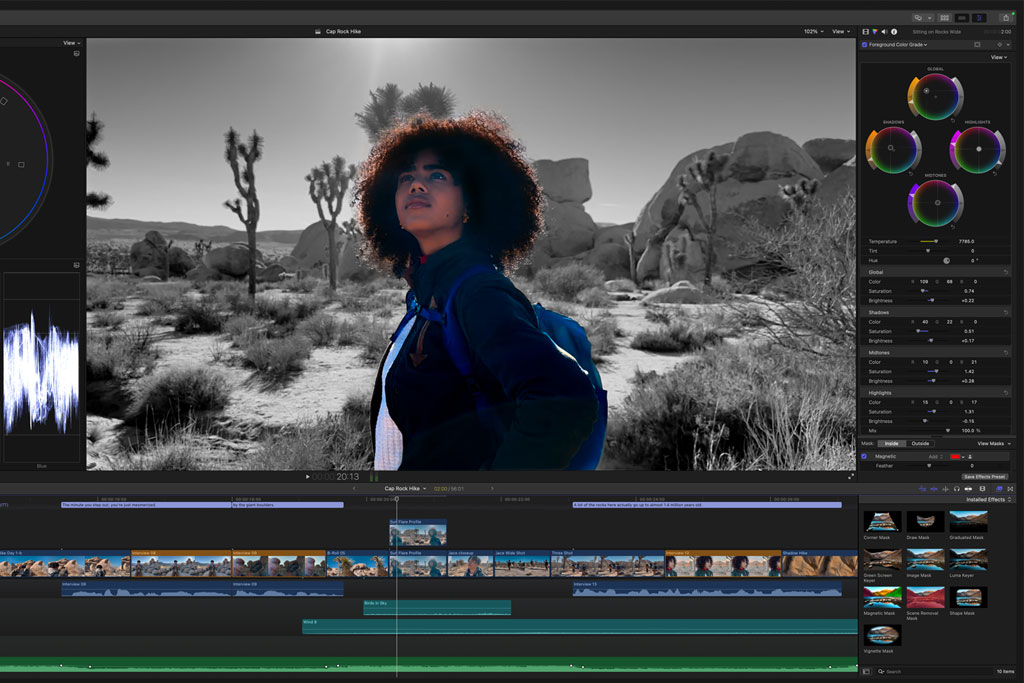
Paid tools usually offer more advanced features, better performance, and professional results.
1. Adobe Premiere Pro
One of the most popular video editing tools used by professionals worldwide.
Best for: Professionals and serious creators
Key Features:
- Advanced timeline editing
- Seamless integration with other Adobe tools
- Regular updates
Pros:
- Industry-standard software
- Powerful features
Cons:
- Subscription-based (can be expensive)
2. Final Cut Pro
A powerful editing tool designed exclusively for Mac users.
Best for: Mac users and professionals
Key Features:
- Fast performance
- Magnetic timeline
- Advanced editing tools
Pros:
- One-time purchase
- Smooth and optimized for Mac
Cons:
- Not available for Windows
3. Filmora
Filmora strikes a perfect balance between simplicity and advanced features.
Best for: Beginners and intermediate users
Key Features:
- Easy-to-use interface
- Built-in effects and templates
- Drag-and-drop editing
Pros:
- Beginner-friendly
- Affordable
Cons:
- Limited advanced control compared to pro tools
Free vs Paid: Which One Should You Choose?

Choosing between free and paid software depends on your needs.
Choose Free Software If:
- You are a beginner
- You have a limited budget
- You create simple or casual videos
Choose Paid Software If:
- You want professional-quality results
- You work on complex projects
- You need advanced tools and features
In many cases, beginners can start with free tools and upgrade later as their skills improve.
Key Features to Look for in 2026
When choosing video editing software, keep an eye on these important features:
- User-friendly interface
- Fast performance and rendering speed
- Advanced editing tools
- Audio editing capabilities
- Compatibility with your device
These factors will ensure a smooth and efficient editing experience.
Tips for Choosing the Right Software

- Start with your skill level—don’t jump into complex tools too quickly
- Consider your editing goals (YouTube, social media, professional work)
- Test free versions before buying paid tools
- Look for software with good tutorials and support
Making the right choice early can save you time and frustration.
FAQs
1. What is the best free video editing software in 2026?
DaVinci Resolve is considered one of the best free options due to its powerful features and professional tools.
2. Which video editing software is best for beginners?
CapCut and Filmora are great choices for beginners because of their easy-to-use interfaces.
3. Is paid video editing software worth it?
Yes, if you need advanced features, better performance, and professional-quality results.
4. Can I create professional videos with free software?
Yes, tools like DaVinci Resolve offer professional-level features even in their free versions.
5. Which software is best for YouTube creators?
Adobe Premiere Pro and Filmora are popular choices among YouTubers.
6. How do I choose the right video editing software?
Consider your skill level, budget, and editing goals before making a decision.
Who should use Digital Tools
Top Video Editing Software 2026: Free & Paid Tools Compared is built for readers who want a faster way to finish everyday web tasks. The main goal is shorter workflows, clearer outputs, and reusable tool habits, so the guide focuses on practical choices instead of broad theory.
Use it when you need one of these outcomes:
- testing a task before choosing a heavier app
- saving time on a repeated browser workflow
- combining a guide with a related AltFTool utility
How to get a better result
- Read the core use case and decide what output you need.
- Open the related AltFTool utility and test it with a small sample.
- Review the result, adjust settings, and repeat only if needed.
- Continue with related tools or guides for the next step in the workflow.
Start small, check the first output, and only then repeat the workflow with the full file, text, media, or game session. That gives you a quick quality check before you spend more time.
Quality checks before you trust the output
- the input is clean before running the tool
- the output matches the format you need
- private details are removed before sharing or downloading
Do not overcomplicate a simple task. Start with the smallest sample that proves the workflow, then scale up once the output looks right.
Continue your workflow
If you want to try the workflow now, open the related AltFTool tool area. For more reading, continue through the Digital Tools archive or the AltFTool tools directory.
This creates a cleaner path from explanation to action: read the guide, test the tool, compare the output, and move into the next related AltFTool resource only when it helps the task.
Reader questions
Quick answers
What is Top Video Editing Software 2026: Free & Paid Tools Compared about?
Video content continues to dominate the digital world in 2026. Whether you're creating YouTube videos, social media reels, or professional projects, having the
When should I use Digital Tools?
Use Digital Tools when you need testing a task before choosing a heavier app or saving time on a repeated browser workflow. It is best for shorter workflows, clearer outputs, and reusable tool habits.
How do I get better results from Digital Tools?
Start with a small sample, then check that the input is clean before running the tool and the output matches the format you need. Review the output before using it in a final workflow.
Where can I find more Digital Tools guides?
Use the AltFTool blog archive, AltFTool tools directory, and related links on this page to explore more Digital Tools tutorials, tool workflows, and practical recommendations.
Sources and review notes
References used to check facts, freshness, and reader-safe recommendations in this guide.
Reviewed against AltFTool editorial guidance, related site archives, and linked tool pages for freshness and reader usefulness.
- 1AltFTool Digital Tools archive
AltFTool
- 2AltFTool tools directory
AltFTool
Discussion
0 comments
No comments yet
Discussion will appear here once it loads.