
Content creation has evolved rapidly over the last few years, and creators now expect editing tools to do much more than basic cutting and trimming. Modern creators want AI-powered transcription, automatic subtitles, noise removal, screen recording, podcast editing, and text-based video editing all in one place. This is exactly why Descript became so popular among podcasters, YouTubers, marketers, and businesses. Its unique text-based editing system made audio and video editing much easier for beginners.
However, Descript is not the perfect solution for everyone. Some users find its pricing expensive, while others need more advanced editing tools, smoother performance, or better collaboration features. Many creators are now searching for Descript alternatives that provide similar AI-powered functionality while offering better flexibility, affordability, or professional-level editing capabilities.
In this article, we’ll explore the 10 best Descript alternatives in 2026, including both free and paid options. Whether you are a beginner creator, podcast host, or professional editor, you’ll find a platform that matches your workflow and budget.
Why People Are Looking for Descript Alternatives
Although Descript is a powerful editing tool, it still has a few limitations that encourage creators to explore other options. Some users feel restricted by its editing capabilities, especially when working on more advanced video projects. Others prefer software that offers stronger audio editing tools, faster rendering speeds, or better AI-powered features.
Another common reason is pricing. While Descript offers useful tools, many of its advanced features are locked behind premium plans. Creators who are just starting out often look for free or more affordable alternatives that provide similar functionality without requiring expensive monthly subscriptions.
Additionally, some creators simply want software designed specifically for their niche. For example, podcasters may prefer tools optimized for remote interviews and audio quality, while YouTubers may prioritize cinematic editing features and motion graphics.
Adobe Premiere Pro
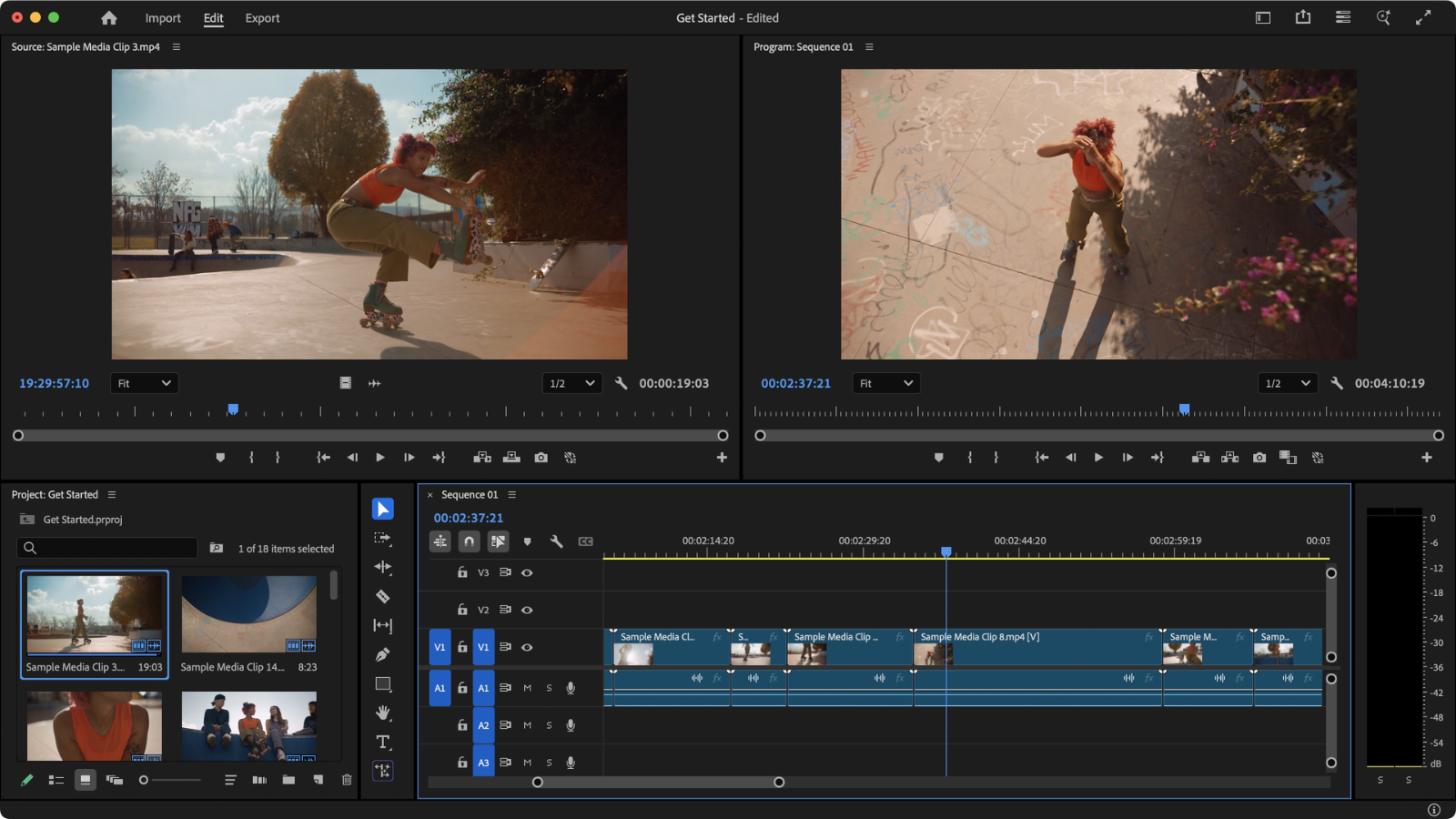
Adobe Premiere Pro remains one of the strongest alternatives to Descript in 2026. It is widely used by professional video editors, filmmakers, and YouTubers because of its advanced editing capabilities and AI-powered workflow tools. Adobe has integrated automatic transcription, AI subtitle generation, and intelligent editing features that make content creation faster and more efficient.
One of the biggest advantages of Premiere Pro is its flexibility. Users can create everything from short social media clips to full-length documentaries using the same platform. The software also integrates seamlessly with other Adobe Creative Cloud applications like After Effects and Audition, allowing creators to build a complete professional editing workflow.
Although Premiere Pro has a steeper learning curve than Descript, it offers significantly more creative control. It is best suited for creators who want professional-level editing and are willing to invest time learning advanced tools.
VEED.io

VEED.io has become one of the most popular browser-based video editing platforms available today. Unlike traditional editing software that requires installation, VEED.io works directly inside your web browser, making it fast and accessible for creators who want a simple editing experience.
The platform includes AI-powered subtitle generation, screen recording, voiceovers, and video templates designed specifically for social media platforms like YouTube, TikTok, and Instagram. Its clean and beginner-friendly interface makes editing easy even for users with no prior experience.
VEED.io is particularly useful for marketers, educators, and content creators who need quick turnaround times. Since the platform is cloud-based, users can edit projects from almost any device without worrying about hardware limitations.
Riverside.fm
Riverside.fm is an excellent Descript alternative for podcasters and interview creators. The platform focuses heavily on high-quality remote recording and AI-powered content repurposing tools. Unlike many online recording platforms, Riverside records audio and video locally on each participant’s device, resulting in significantly better quality.
One of its standout features is the ability to generate short clips automatically from long podcast episodes. This helps creators quickly create social media content without spending hours editing manually. Riverside also includes transcription tools, speaker detection, and automatic captions.
For creators who frequently host interviews or podcasts remotely, Riverside.fm offers a streamlined workflow that combines recording, editing, and publishing in one platform.
CapCut
CapCut has evolved into one of the most powerful free editing tools for social media creators. Originally known as a mobile editing app, CapCut now offers desktop editing, cloud syncing, AI-powered features, and advanced video effects.
One of the reasons creators love CapCut is its simplicity. Users can quickly edit short-form videos, add trending effects, generate automatic captions, and export content optimized for platforms like TikTok, Instagram Reels, and YouTube Shorts.
Despite being beginner-friendly, CapCut still includes surprisingly advanced tools such as AI background removal, motion tracking, and voice enhancement. Many creators choose CapCut because it offers powerful functionality without requiring expensive subscriptions.
Final Cut Pro
Final Cut Pro is Apple’s professional video editing software designed exclusively for Mac users. It is known for its incredible performance optimization, especially on Apple Silicon devices like the MacBook Pro and Mac Studio.
The software includes advanced editing features such as magnetic timelines, motion graphics, multi-camera editing, and professional color grading. Final Cut Pro is often preferred by filmmakers and advanced YouTubers who want fast rendering speeds and a smooth editing experience.
Unlike subscription-based platforms, Final Cut Pro requires a one-time payment, which many creators appreciate in the long run. While it may not be as beginner-friendly as Descript, it offers exceptional power for professional projects.
Camtasia
Camtasia is one of the best alternatives for educators, trainers, and tutorial creators. The software combines screen recording and video editing into a single easy-to-use platform.
Many online course creators use Camtasia because it allows them to record presentations, tutorials, and demonstrations while editing everything inside the same interface. Features like cursor animations, transitions, and built-in assets make educational videos more engaging.
Although Camtasia lacks advanced cinematic editing tools, it excels in simplicity and productivity. It’s ideal for creators who prioritize screen recording and instructional content over complex video production.
Podcastle
Podcastle is another strong Descript competitor focused primarily on podcasting and audio content creation. It uses AI-powered tools to simplify recording, editing, and enhancing audio quality.
The platform includes features like AI voice enhancement, background noise removal, text-based editing, and remote interview recording. Podcast creators can quickly clean up their recordings without needing advanced technical skills.
Podcastle is especially useful for solo creators and small teams that want professional-sounding podcasts without investing in expensive audio equipment or complicated editing software.
DaVinci Resolve
DaVinci Resolve is widely considered one of the most powerful free video editing tools available today. Originally developed for Hollywood-level color grading, it has evolved into a complete editing suite with professional audio, visual effects, and motion graphics tools.
One of the biggest advantages of DaVinci Resolve is its free version, which includes features that many competitors reserve for paid plans. Professional editors appreciate its advanced timeline controls, collaborative editing tools, and industry-leading color correction capabilities.
However, DaVinci Resolve requires a relatively powerful computer and has a steeper learning curve compared to beginner-focused platforms. Still, for creators willing to learn, it offers unmatched value.
Filmora
Filmora is a great middle-ground option between beginner simplicity and advanced editing functionality. It provides an easy drag-and-drop editing experience while still including useful AI-powered tools like auto captions, smart cutouts, and motion tracking.
The software is especially popular among YouTubers and small business creators who want polished videos without spending months learning professional editing software.
Filmora also offers a large library of effects, transitions, and templates that help creators produce engaging content quickly. Its affordable pricing makes it appealing for creators on a budget.
Audition and Premiere Pro Workflow
Some professional creators prefer combining Adobe Audition with Premiere Pro instead of relying on all-in-one platforms like Descript. This workflow allows for more precise control over both video and audio production.
Adobe Audition offers advanced sound cleanup, multi-track editing, and professional mixing capabilities, while Premiere Pro handles the visual editing process. Together, they create a highly customizable production workflow suitable for podcasts, YouTube videos, and commercial projects.
Although this setup requires more editing experience, it delivers far greater creative flexibility than most beginner-focused platforms.
How to Choose the Right Descript Alternative
Choosing the best Descript alternative depends entirely on your content creation goals. Beginners may prefer tools like CapCut or Filmora because they are easy to learn and affordable. Professional editors may benefit more from DaVinci Resolve or Adobe Premiere Pro because of their advanced editing capabilities.
Podcasters should prioritize audio quality and remote recording features, making Riverside.fm and Podcastle excellent choices. Meanwhile, marketers and social media creators may find VEED.io more convenient because of its browser-based editing workflow.
Before selecting a platform, consider factors like pricing, AI features, ease of use, collaboration tools, and hardware requirements.
Conclusion
Descript remains a strong content creation tool, but it is no longer the only powerful option available in 2026. Today’s creators have access to a wide variety of editing platforms designed for different workflows, skill levels, and budgets.
If you need fast online editing, VEED.io is a great choice. If you want professional-grade editing, DaVinci Resolve and Adobe Premiere Pro are excellent options. Podcasters may prefer Riverside.fm or Podcastle for their specialized audio tools, while social media creators can benefit from CapCut’s simplicity and speed.
Ultimately, the best Descript alternative is the one that improves your workflow, saves time, and helps you create high-quality content consistently. Testing a few platforms before committing is the best way to discover which tool fits your creative process.
FAQ
Who should use Digital Tools
10 Best Descript Alternatives in 2026 (Free & Paid) is built for readers who want a faster way to finish everyday web tasks. The main goal is shorter workflows, clearer outputs, and reusable tool habits, so the guide focuses on practical choices instead of broad theory.
Use it when you need one of these outcomes:
- testing a task before choosing a heavier app
- saving time on a repeated browser workflow
- combining a guide with a related AltFTool utility
How to get a better result
- Read the core use case and decide what output you need.
- Open the related AltFTool utility and test it with a small sample.
- Review the result, adjust settings, and repeat only if needed.
- Continue with related tools or guides for the next step in the workflow.
Start small, check the first output, and only then repeat the workflow with the full file, text, media, or game session. That gives you a quick quality check before you spend more time.
Quality checks before you trust the output
- the input is clean before running the tool
- the output matches the format you need
- private details are removed before sharing or downloading
Do not overcomplicate a simple task. Start with the smallest sample that proves the workflow, then scale up once the output looks right.
Continue your workflow
If you want to try the workflow now, open the related AltFTool tool area. For more reading, continue through the Digital Tools archive or the AltFTool tools directory.
This creates a cleaner path from explanation to action: read the guide, test the tool, compare the output, and move into the next related AltFTool resource only when it helps the task.
Reader questions
Quick answers
What is 10 Best Descript Alternatives in 2026 (Free & Paid) about?
Content creation has evolved rapidly over the last few years, and creators now expect editing tools to do much more than basic cutting and trimming. Modern crea
When should I use Digital Tools?
Use Digital Tools when you need testing a task before choosing a heavier app or saving time on a repeated browser workflow. It is best for shorter workflows, clearer outputs, and reusable tool habits.
How do I get better results from Digital Tools?
Start with a small sample, then check that the input is clean before running the tool and the output matches the format you need. Review the output before using it in a final workflow.
Where can I find more Digital Tools guides?
Use the AltFTool blog archive, AltFTool tools directory, and related links on this page to explore more Digital Tools tutorials, tool workflows, and practical recommendations.
Sources and review notes
References used to check facts, freshness, and reader-safe recommendations in this guide.
Reviewed against AltFTool editorial guidance, related site archives, and linked tool pages for freshness and reader usefulness.
- 1AltFTool Digital Tools archive
AltFTool
- 2AltFTool tools directory
AltFTool
Discussion
0 comments
No comments yet
Discussion will appear here once it loads.