
Creating the perfect Instagram caption is not always easy. Sometimes you have a great photo, an amazing reel, or a creative story idea, but you struggle to find the right words to match your content. A strong caption can make your post more engaging, increase likes and comments, and help your audience connect with your personality or brand. This is where a free Instagram caption generator becomes incredibly useful.
An Instagram caption generator is an AI-powered tool designed to create unique, catchy, and engaging captions instantly. Whether you are an influencer, business owner, content creator, or casual Instagram user, these tools save time and help improve your social media presence. Instead of spending several minutes thinking about the perfect line, you can generate multiple caption ideas in seconds.
In today’s fast-moving social media world, consistency matters. Posting regularly with high-quality captions can improve engagement and help your content stand out from millions of daily Instagram posts. Using a caption generator makes content creation easier and more efficient.

What Is an Instagram Caption Generator?
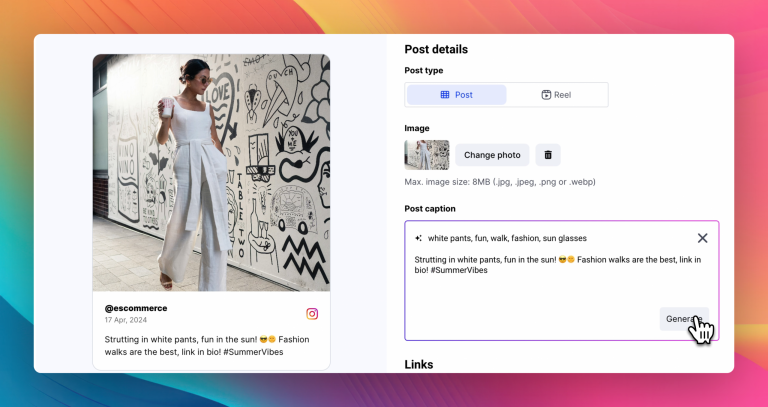
An Instagram caption generator is an online tool that automatically creates captions for Instagram posts using artificial intelligence or pre-built templates. Users simply enter a keyword, topic, mood, or short description, and the tool generates relevant caption suggestions.
These tools can create different styles of captions, including:
- Funny captions
- Motivational captions
- Travel captions
- Selfie captions
- Fashion captions
- Business and marketing captions
- Romantic captions
- Fitness captions
- Seasonal or festival captions
Modern AI caption generators understand tone and context, making the generated captions more natural and engaging. Some advanced tools even create captions with hashtags, emojis, and call-to-action phrases to increase post interaction.
Why Instagram Captions Are Important
Many people focus only on photos and videos, but captions play a major role in Instagram engagement. A strong caption can encourage users to comment, share, or save your post. It also helps explain the message behind your content.
Good captions can:
- Increase audience engagement
- Improve brand identity
- Make posts more relatable
- Encourage conversations
- Add humor or emotion
- Support storytelling
- Improve reach through keywords and hashtags
For businesses and influencers, captions are especially important because they help build trust and connect with followers. A creative caption can turn a simple image into a memorable social media post.
Benefits of Using a Free Instagram Caption Generator
Saves Time
Writing captions daily can become tiring and time-consuming. A caption generator creates ideas instantly, helping users post faster without sacrificing creativity.
Boosts Creativity
Sometimes users run out of ideas or experience writer’s block. AI-generated captions provide fresh inspiration and help users discover new writing styles.
Improves Engagement
Creative and attention-grabbing captions often perform better on Instagram. Many caption generators are designed to create captions that encourage likes, comments, and shares.
Helps Maintain Consistency
For content creators and brands, posting consistently is important. Caption generators make it easier to create content regularly without stress.
Perfect for Beginners
Not everyone is confident in writing social media content. Caption generators help beginners create professional-looking captions easily.
Features to Look for in an Instagram Caption Generator
Not all caption generators offer the same quality. The best tools usually include several useful features that improve the user experience.
Multiple Caption Styles
A good generator should offer different caption tones such as funny, professional, romantic, inspirational, or trendy.
AI-Powered Suggestions
AI-based tools create more natural and personalized captions compared to simple template-based generators.
Hashtag Recommendations
Some tools automatically generate relevant hashtags to improve post visibility and reach.
Emoji Support
Emojis make captions more expressive and visually appealing. Many generators include emoji suggestions automatically.
Fast and Easy Interface
The tool should be simple to use, even for beginners, with quick results and minimal setup.
How to Use an Instagram Caption Generator
Using a caption generator is usually very simple. Most tools follow a few easy steps:
- Enter a keyword or describe your post
- Choose the caption style or tone
- Click the generate button
- Review the generated captions
- Copy and paste your favorite caption into Instagram
Some tools also allow users to customize captions further by adding emojis, hashtags, or personal touches.
Best Ways to Make Captions More Engaging
Even when using AI tools, adding a personal touch can make captions more effective. Here are some simple tips to improve engagement:
Ask Questions
Questions encourage followers to comment and interact with your post.
Example: “Which travel destination should I visit next?”
Add Humor
Funny captions often attract attention and make posts more shareable.
Use Storytelling
Short stories create emotional connections and make content more memorable.
Include Call-to-Actions
Encourage users to engage with phrases like:
- “Tag a friend”
- “Save this post”
“Comment your opinion”
Keep It Authentic
People connect more with genuine and relatable captions rather than overly promotional content.
Who Can Benefit from Caption Generators?
Instagram caption generators are useful for many different users, including:
- Influencers
- Small business owners
- Social media managers
- Digital marketers
- Bloggers
- Content creators
- Online stores
- Casual Instagram users
Whether someone posts daily selfies, travel photos, product promotions, or motivational content, caption generators help simplify the creative process.
FAQ
Who should use Digital Tools
Free Instagram Caption Generator for Creative Social Media Posts is built for readers who want a faster way to finish everyday web tasks. The main goal is shorter workflows, clearer outputs, and reusable tool habits, so the guide focuses on practical choices instead of broad theory.
Use it when you need one of these outcomes:
- testing a task before choosing a heavier app
- saving time on a repeated browser workflow
- combining a guide with a related AltFTool utility
How to get a better result
- Read the core use case and decide what output you need.
- Open the related AltFTool utility and test it with a small sample.
- Review the result, adjust settings, and repeat only if needed.
- Continue with related tools or guides for the next step in the workflow.
Start small, check the first output, and only then repeat the workflow with the full file, text, media, or game session. That gives you a quick quality check before you spend more time.
Quality checks before you trust the output
- the input is clean before running the tool
- the output matches the format you need
- private details are removed before sharing or downloading
Do not overcomplicate a simple task. Start with the smallest sample that proves the workflow, then scale up once the output looks right.
Continue your workflow
If you want to try the workflow now, open the related AltFTool tool area. For more reading, continue through the Digital Tools archive or the AltFTool tools directory.
This creates a cleaner path from explanation to action: read the guide, test the tool, compare the output, and move into the next related AltFTool resource only when it helps the task.
Reader questions
Quick answers
What is Free Instagram Caption Generator for Creative Social Media Posts about?
Creating the perfect Instagram caption is not always easy. Sometimes you have a great photo, an amazing reel, or a creative story idea, but you struggle to find
When should I use Digital Tools?
Use Digital Tools when you need testing a task before choosing a heavier app or saving time on a repeated browser workflow. It is best for shorter workflows, clearer outputs, and reusable tool habits.
How do I get better results from Digital Tools?
Start with a small sample, then check that the input is clean before running the tool and the output matches the format you need. Review the output before using it in a final workflow.
Where can I find more Digital Tools guides?
Use the AltFTool blog archive, AltFTool tools directory, and related links on this page to explore more Digital Tools tutorials, tool workflows, and practical recommendations.
Sources and review notes
References used to check facts, freshness, and reader-safe recommendations in this guide.
Reviewed against AltFTool editorial guidance, related site archives, and linked tool pages for freshness and reader usefulness.
- 1AltFTool Digital Tools archive
AltFTool
- 2AltFTool tools directory
AltFTool
Discussion
0 comments
No comments yet
Discussion will appear here once it loads.