
Managing invoices professionally is an important part of every business. Whether you are a freelancer, startup owner, consultant, agency, or small business operator, proper invoicing helps maintain payment records, improve client communication, and strengthen your business image. A clean and professional invoice not only makes billing easier but also increases trust and improves payment speed.
Today, many businesses use invoice templates to simplify billing workflows and reduce manual work. Instead of creating invoices from scratch every time, ready-made invoice templates help businesses generate professional invoices quickly with better accuracy and organization.
As digital business operations continue growing, smart invoice templates are becoming essential tools for fast and professional billing.
What Are Invoice Templates?
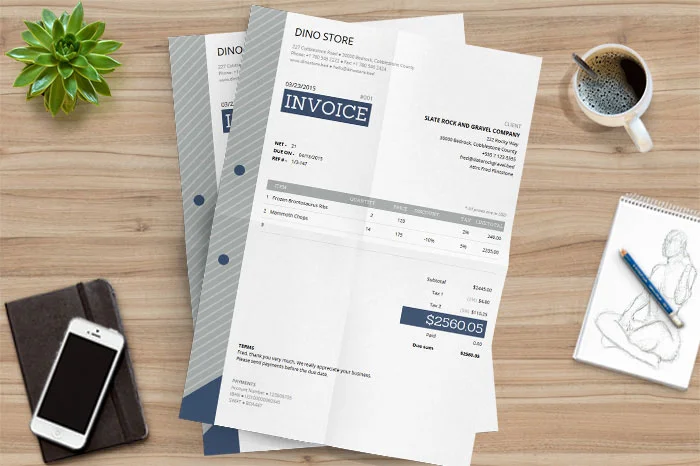
Invoice templates are pre-designed billing formats that businesses can customize according to their needs. These templates usually include sections for company details, client information, invoice numbers, pricing, taxes, and payment terms.
They help businesses create organized invoices without requiring advanced accounting or design knowledge.
Common Invoice Template Formats
- PDF invoice templates
- Excel invoice sheets
- Word invoice templates
- Google Docs invoices
- Online invoice generators
GST invoice templates
These formats help businesses choose the best invoicing solution based on their workflow.
Why Businesses Use Invoice Templates
Creating invoices manually can take time and increase the chances of mistakes. Invoice templates help automate and simplify the billing process while maintaining professionalism.
Professional invoices also improve client experience and help businesses appear more reliable.
Benefits of Invoice Templates
- Faster invoice creation
- Better financial organization
- Improved payment tracking
- Reduced billing errors
- Professional appearance
- Easier tax management
Time-saving workflow
Businesses using professional invoice templates often manage payments more efficiently.
Important Elements of a Professional Invoice
A proper invoice should contain all important payment and business details clearly. Missing information may delay payments and create confusion for clients.
Well-designed invoice templates ensure everything is properly organized.
Details Included in Invoice Templates
- Business name and logo
- Client information
- Invoice number
- Billing date
- Due date
- Product or service details
- Quantity and pricing
- Tax information
- Total payment amount
Payment instructions
Clear invoices improve communication and help clients process payments faster.
Invoice Templates for Freelancers
Freelancers often work with multiple clients and projects at the same time. Invoice templates help freelancers manage payments professionally and maintain organized records.
A professional invoice also creates a stronger impression on clients and improves trust.
Freelancer Invoice Features
- Hourly billing support
- Project pricing sections
- Personal branding options
- Payment reminders
- Tax calculations
Multi-client organization
Using invoice templates allows freelancers to spend more time on work and less on administrative tasks.
Invoice Templates for Small Businesses
Small businesses require accurate billing systems to maintain healthy cash flow and organized records.
Professional invoice templates simplify financial management and reduce manual paperwork.
Benefits for Small Businesses
- Faster payment collection
- Better bookkeeping
- Reduced accounting mistakes
- Professional client communication
- Improved cash flow management
Easy invoice tracking
Digital invoice systems also improve productivity and workflow efficiency.
Digital Invoicing vs Manual Billing
Traditional paper invoices can be slow, difficult to manage, and more likely to contain errors. Digital invoice templates provide a faster and smarter solution.
Modern businesses now prefer cloud-based invoicing systems for better convenience.
Advantages of Digital Invoice Templates
- Automatic calculations
- Faster invoice delivery
- Cloud storage support
- Mobile accessibility
- Easy customization
- Reduced paperwork
Better accuracy
Digital invoicing helps businesses improve speed, organization, and payment tracking.
Features to Look for in Invoice Templates
Not every invoice template offers the same features. Businesses should choose templates that match their billing requirements and workflow.
Modern invoice templates often include automation features for improved efficiency.
Important Features
- Editable invoice fields
- Tax calculation support
- Currency options
- PDF export
- Branding customization
- Professional design
- Mobile compatibility
Automated totals
Templates with smart automation features help businesses save time and reduce manual effort.
Who should use Digital Tools
Best Invoice Templates for Fast & Professional Billing is built for readers who want a faster way to finish everyday web tasks. The main goal is shorter workflows, clearer outputs, and reusable tool habits, so the guide focuses on practical choices instead of broad theory.
Use it when you need one of these outcomes:
- testing a task before choosing a heavier app
- saving time on a repeated browser workflow
- combining a guide with a related AltFTool utility
How to get a better result
- Read the core use case and decide what output you need.
- Open the related AltFTool utility and test it with a small sample.
- Review the result, adjust settings, and repeat only if needed.
- Continue with related tools or guides for the next step in the workflow.
Start small, check the first output, and only then repeat the workflow with the full file, text, media, or game session. That gives you a quick quality check before you spend more time.
Quality checks before you trust the output
- the input is clean before running the tool
- the output matches the format you need
- private details are removed before sharing or downloading
Do not overcomplicate a simple task. Start with the smallest sample that proves the workflow, then scale up once the output looks right.
Continue your workflow
If you want to try the workflow now, open the related AltFTool tool area. For more reading, continue through the Digital Tools archive or the AltFTool tools directory.
This creates a cleaner path from explanation to action: read the guide, test the tool, compare the output, and move into the next related AltFTool resource only when it helps the task.
Reader questions
Quick answers
What is Best Invoice Templates for Fast & Professional Billing about?
Managing invoices professionally is an important part of every business. Whether you are a freelancer, startup owner, consultant, agency, or small business oper
When should I use Digital Tools?
Use Digital Tools when you need testing a task before choosing a heavier app or saving time on a repeated browser workflow. It is best for shorter workflows, clearer outputs, and reusable tool habits.
How do I get better results from Digital Tools?
Start with a small sample, then check that the input is clean before running the tool and the output matches the format you need. Review the output before using it in a final workflow.
Where can I find more Digital Tools guides?
Use the AltFTool blog archive, AltFTool tools directory, and related links on this page to explore more Digital Tools tutorials, tool workflows, and practical recommendations.
Sources and review notes
References used to check facts, freshness, and reader-safe recommendations in this guide.
Reviewed against AltFTool editorial guidance, related site archives, and linked tool pages for freshness and reader usefulness.
- 1AltFTool Digital Tools archive
AltFTool
- 2AltFTool tools directory
AltFTool
Discussion
0 comments
No comments yet
Discussion will appear here once it loads.