
The Dots and Boxes game on AltFTool is a web-based adaptation of the classic pencil-and-paper strategy game. It is featured within the platform’s “Arcade” section, which offers digital versions of traditional puzzles and interactive tools.
This game allows users to enjoy a simple yet strategic gameplay experience directly in their browser, making it both accessible and engaging. Alongside other popular titles like the Flappy Bird Game and Memory Match Game, it contributes to AltFTool’s growing collection of casual, brain-stimulating games.
Game Overview and Objective
The primary goal of Dots and Boxes is to claim more “boxes” than your opponent. Players take turns drawing a single horizontal or vertical line between two unjoined adjacent dots. When a player completes the fourth side of a 1×1 square (a box), they “claim” that box, usually marked with their color or initial, and earn a point. Completing a box also grants that player an immediate extra turn.AltFTool
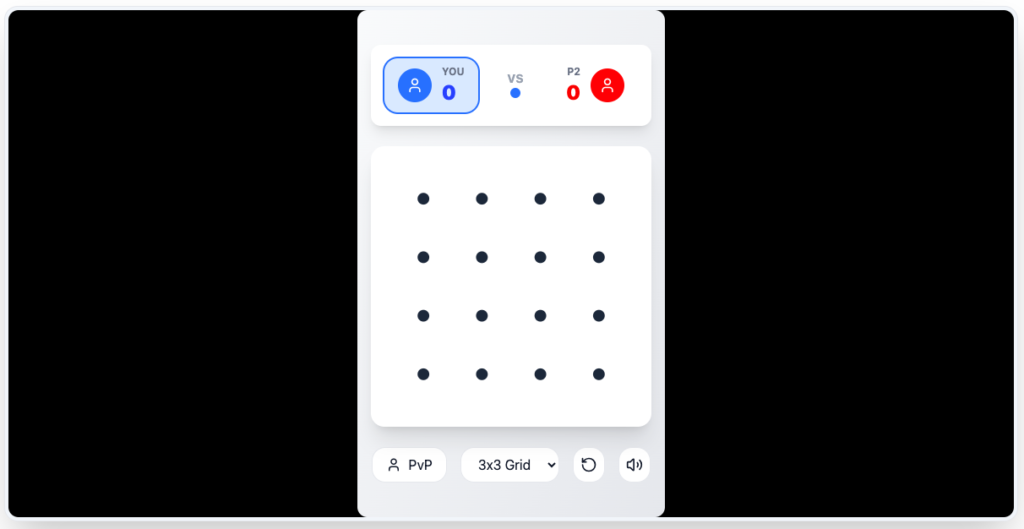
Key Features on AltFTool
The version hosted on AltFTool includes several customization options to adjust the difficulty and length of the game:
Grid Size Selection: You can choose from multiple grid dimensions depending on how long you want the match to last:
3x3 Grid(Short, quick game)4x4 Grid5x5 Grid6x6 Grid(Longer, more strategic game)
Game Modes: The platform supports
PvP(Player vs. Player) mode, allowing two people to play against each other locally.Score Tracking: The interface features a real-time scoreboard displaying
YOUvsP2(Player 2) to keep track of boxes claimed during the session.
How to Play
While the traditional game is purely about drawing lines, the AltFTool interface provides the following interaction methods:
Selection: Use your mouse or touch screen to click/tap on the grey spaces between dots to place a line.
Navigation: The site mentions keyboard support where Arrow Keys can sometimes be used to navigate the menu or grid, and the Space bar may act as a selection or “boost” mechanic in certain arcade contexts.
Winning: The game ends when all possible lines have been drawn and all boxes are claimed. The player with the highest number of boxes wins.
Technical Details and UI
Platform: It is a browser-based tool, meaning no download is required. It works on both desktop and mobile browsers.
Leaderboard: The page features a “Local High Scores” section. Note that these scores are typically saved to your browser’s local storage rather than a global server, meaning they will persist on your device but won’t be visible to others on different computers.
Visuals: The UI is clean and minimalist, focusing on the grid to ensure the strategy remains the focal point.
Game Features Overview
| Feature | Description |
| Complexity | Simple rules that are easy to learn, combined with deep strategic gameplay. |
| Grid Sizes | Multiple grid options available: 3×3, 4×4, 5×5, and 6×6 for varied challenges. |
| Players | Supports Local Multiplayer (Player vs Player) for competitive fun. |
| Platform | Play directly on your web browser via AltFTool Arcade—no downloads required. |
| Cost | Completely free to play with no hidden charges. |
Who should use Games
Dots and Boxes Online: Challenge Friends in the Arcade is built for players who want a quick browser game with clear rules and short practice loops. The main goal is focus, timing, decision-making, and repeatable play sessions, so the guide focuses on practical choices instead of broad theory.
Use it when you need one of these outcomes:
- short focus breaks between work sessions
- logic or reflex practice without installing an app
- quick challenges that are easy to restart and improve
How to get a better result
- Read the basic objective before starting your first run.
- Play one short round to understand movement, timing, and scoring.
- Replay with one improvement target, such as fewer mistakes or a higher score.
- Use related game guides when you want a different pace or challenge style.
Start small, check the first output, and only then repeat the workflow with the full file, text, media, or game session. That gives you a quick quality check before you spend more time.
Quality checks before you trust the output
- controls feel responsive on desktop and mobile
- difficulty increases in a way that still feels fair
- the goal is clear before the first round starts
Do not judge the game from a single failed round. Fast games reward rhythm, while puzzle games reward slower scanning and planning.
Continue your workflow
If you want to try the workflow now, open the related AltFTool tool area. For more reading, continue through the Games archive or the AltFTool game and puzzle topic cluster.
This creates a cleaner path from explanation to action: read the guide, test the tool, compare the output, and move into the next related AltFTool resource only when it helps the task.
Reader questions
Quick answers
What is Dots and Boxes Online: Challenge Friends in the Arcade about?
The Dots and Boxes game on AltFTool is a web-based version of the classic pencil-and-paper strategy game. It is part of the site’s “Arcade” section, w
When should I use Games?
Use Games when you need short focus breaks between work sessions or logic or reflex practice without installing an app. It is best for focus, timing, decision-making, and repeatable play sessions.
How do I get better results from Games?
Start with a small sample, then check that controls feel responsive on desktop and mobile and difficulty increases in a way that still feels fair. Review the output before using it in a final workflow.
Where can I find more Games guides?
Use the AltFTool blog archive, AltFTool game and puzzle topic cluster, and related links on this page to explore more Games tutorials, tool workflows, and practical recommendations.
Sources and review notes
References used to check facts, freshness, and reader-safe recommendations in this guide.
Reviewed against AltFTool editorial guidance, related site archives, and linked tool pages for freshness and reader usefulness.
- 1AltFTool Games archive
AltFTool
- 2
- 3AltFTool related tools area
AltFTool


Discussion
0 comments
No comments yet
Discussion will appear here once it loads.