
In today’s digital world, sharing information online has become a daily necessity. Whether you are sending private notes, login credentials, or confidential business details, protecting sensitive data is extremely important.
Secure Message Encryptor is a lightweight Chrome extension designed to help users encrypt and decrypt text directly inside the browser. It provides strong encryption so that your messages remain readable only to those who have the correct password.
The extension follows a privacy-first approach and operates entirely within your browser. This means that your text, passwords, and encrypted messages never leave your device and are never sent to external servers.
By using modern encryption standards and a simple interface, Secure Message Encryptor allows users to secure their information quickly without needing advanced technical knowledge.

What is Secure Message Encryptor?
Secure Message Encryptor is a privacy-focused Chrome extension that converts plain text into encrypted ciphertext using strong cryptographic algorithms.
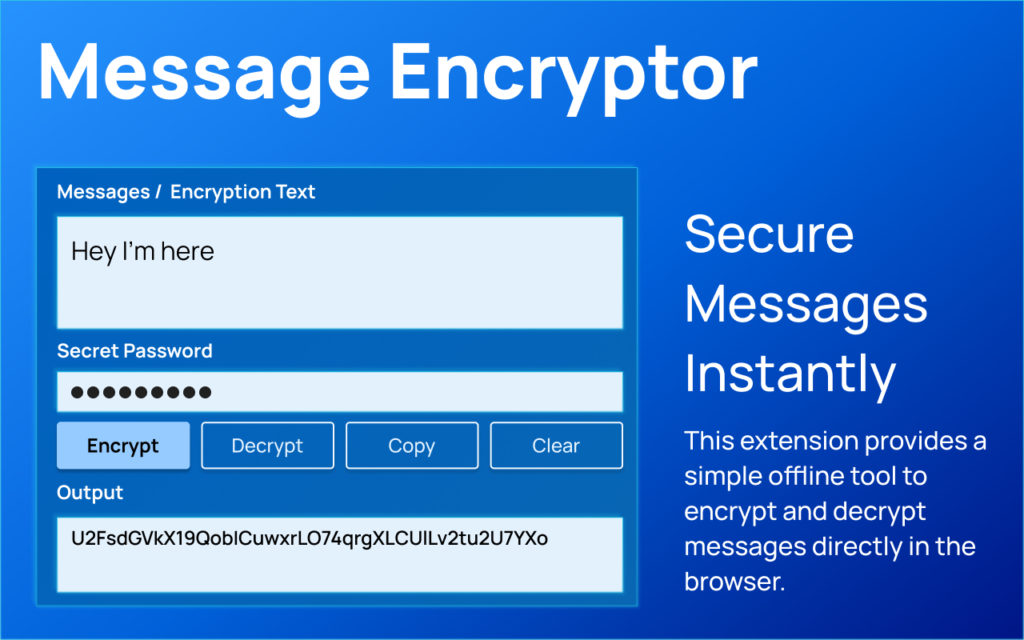
Users can type or paste any message, provide a password, and instantly generate a secure encrypted string. The same tool can also decrypt the message when the correct password is entered.
Because all encryption and decryption operations happen locally inside the browser, the extension follows a zero-knowledge model, ensuring that user data is never stored, transmitted, or monitored.
This makes Secure Message Encryptor a reliable tool for protecting sensitive communication online.
Key Features and Benefits
Secure Message Encryptor provides several features designed to protect user data while maintaining simplicity and speed.
- Instant Encryption and Decryption
Users can easily convert sensitive text into encrypted data and restore it back to the original message using the same interface. - Privacy by Design
All operations happen locally in the browser. No data collection, tracking, or background monitoring is performed. - Industry Standard Encryption
The extension uses the AES-GCM encryption algorithm, a widely trusted standard for secure data protection. - Password-Based Protection
A secure password-based key derivation method ensures that only users with the correct password can decrypt the message. - Zero Permissions Required
Unlike many browser extensions, Secure Message Encryptor does not require special permissions, ensuring complete browsing privacy. Clean and Modern Interface
The extension features a lightweight design with a simple and fast user interface for everyday use.
How the Security Layer Works
Secure Message Encryptor uses a multi-layered cryptographic approach to protect user data. Even if someone obtains the encrypted output, it remains extremely difficult to decrypt without the correct password.
| Security Component | Implementation Detail | Purpose |
| Key Derivation | PBKDF2 with SHA-256 | Converts your password into a strong cryptographic key |
| Iteration Count | 100,000 iterations | Makes brute-force password attacks computationally difficult |
| Encryption Algorithm | AES-GCM (256-bit) | Provides secure and authenticated data encryption |
| Salt & IV | Randomly generated | Ensures each encrypted message is unique |
Simple Explanation
Think of the extension as a secure digital vault.
Your password acts as the vault combination. Before unlocking the vault, the system strengthens that password thousands of times using cryptographic processing. Every time a message is encrypted, the system generates a new unique lock so that even identical messages never produce the same encrypted output.
This approach protects both the confidentiality and integrity of your data.
How It Works
- Using Secure Message Encryptor is simple and only takes a few steps.
- First, install the extension and open the popup from your browser toolbar.
- To encrypt a message, enter the text you want to secure and provide a strong password. When you click the Encrypt button, the extension converts the message into an encrypted Base64 string that can be safely shared.
- To decrypt a message, paste the encrypted string into the decrypt field and enter the correct password. The extension will instantly restore the original message.
- All processes occur locally inside your browser, ensuring complete privacy.
Real Use Cases
Secure Message Encryptor can be useful in many everyday scenarios.
Professionals can use it to send confidential business information securely over email or messaging platforms. Students and researchers can protect sensitive notes and research data. Developers can encrypt API keys or private tokens before sharing them with collaborators.
Even personal users can benefit by protecting passwords, private messages, or confidential documents.
Benefits
- Using Secure Message Encryptor offers several advantages for users who value privacy and security.
- Protects sensitive text with strong encryption
- Ensures messages are readable only with the correct password
- Prevents unauthorized access to confidential information
- Works entirely offline within the browser
- Provides a fast and easy way to secure messages
Privacy & Security
Secure Message Encryptor follows a strict privacy-first policy. The extension does not collect, store, or transmit any personal data.
All encryption processes occur locally in the browser using modern cryptographic standards. No browsing activity is tracked, and no information is sent to external servers.
This ensures that users maintain complete control over their data while using the extension.
FAQs
1. What is Secure Message Encryptor?
Secure Message Encryptor is a Chrome extension that allows users to encrypt and decrypt text securely using password-based encryption.
2. Which encryption algorithm is used?
The extension uses AES-GCM with 256-bit encryption, a widely trusted standard for secure communication.
3. Are messages stored anywhere?
No. All encryption and decryption processes occur locally within the browser.
4. Can I decrypt messages without the password?
No. The original message can only be recovered using the correct password.
5. Does the extension track user activity?
No. Secure Message Encryptor does not track browsing activity or collect personal data
Who should use Extensions
Best Message Encryptor Extension for Secure Text Encryption is built for writers, students, and teams working with text, files, and document cleanup. The main goal is clearer writing, cleaner documents, and faster review workflows, so the guide focuses on practical choices instead of broad theory.
Use it when you need one of these outcomes:
- checking writing length before submission
- combining or preparing files for sharing
- cleaning language, formatting, or readability before publishing
How to get a better result
- Paste or upload a small sample first to confirm the tool behavior.
- Apply the correction, merge, count, or translation workflow.
- Review the output for formatting, meaning, and missing sections.
- Save the final version only after checking the most important details.
Start small, check the first output, and only then repeat the workflow with the full file, text, media, or game session. That gives you a quick quality check before you spend more time.
Quality checks before you trust the output
- the final text still says what you intended
- file order and page order are correct before export
- names, numbers, dates, and translated terms are reviewed manually
Do not treat automated text output as final without review. The tool can speed up cleanup, but names, facts, tone, and context still need a human pass.
Continue your workflow
If you want to try the workflow now, open the related AltFTool tool area. For more reading, continue through the Extensions archive or the AltFTool PDF and document guides.
This creates a cleaner path from explanation to action: read the guide, test the tool, compare the output, and move into the next related AltFTool resource only when it helps the task.
Reader questions
Quick answers
What is Best Message Encryptor Extension for Secure Text Encryption about?
Secure Message Encryptor – Protect Your Sensitive Messages InstantlyIn today’s digital world, sharing information online has become a daily necessity. Whether y
When should I use Extensions?
Use Extensions when you need checking writing length before submission or combining or preparing files for sharing. It is best for clearer writing, cleaner documents, and faster review workflows.
How do I get better results from Extensions?
Start with a small sample, then check that the final text still says what you intended and file order and page order are correct before export. Review the output before using it in a final workflow.
Where can I find more Extensions guides?
Use the AltFTool blog archive, AltFTool PDF and document guides, and related links on this page to explore more Extensions tutorials, tool workflows, and practical recommendations.
Sources and review notes
References used to check facts, freshness, and reader-safe recommendations in this guide.
Reviewed against AltFTool editorial guidance, related site archives, and linked tool pages for freshness and reader usefulness.
- 1AltFTool Extensions archive
AltFTool
- 2AltFTool PDF and document guides
AltFTool
- 3AltFTool related tools area
AltFTool


Discussion
0 comments
No comments yet
Discussion will appear here once it loads.